

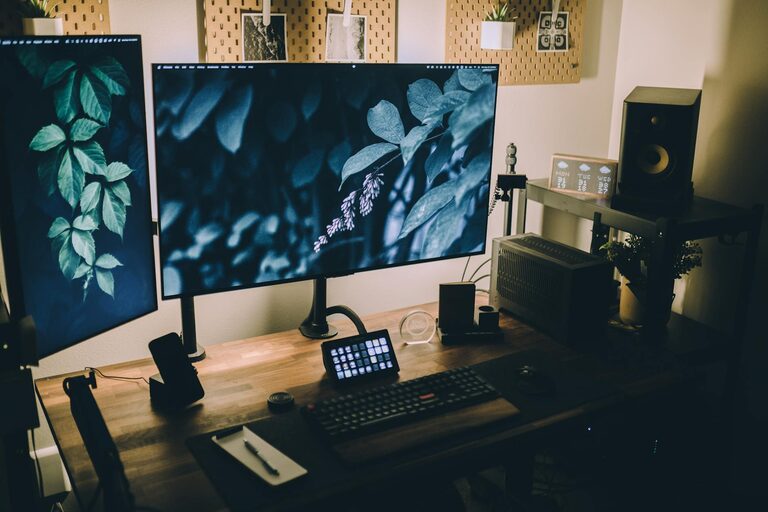
Creating a home workspace that balances relaxation and productivity is essential in today’s world, where many people spend significant time working remotely. A well-designed workspace can help you stay focused, reduce stress, and ultimately enhance your efficiency. Here, we share practical tips to help you build a workspace at home that feels comfortable and supports your work needs.
Choose the Right Location
Prioritise Quiet and Natural Light
Select a spot in your home that is relatively quiet, away from high-traffic areas like the kitchen or living room. Natural light is incredibly important—not only does it reduce eye strain, but it also improves mood and energy levels. Position your desk near a window if possible, but use blinds or curtains to control glare.
Define Your Workspace Boundaries
If you don’t have a separate room for your workspace, carve out a specific corner or zone that is dedicated solely to work. Using a room divider or bookshelf can help create a sense of separation, indicating to both you and others that this is your work area.
Invest in Comfortable Furniture
Ergonomic Chair and Desk
An ergonomic chair that supports your back and encourages good posture is a must. Sitting for long periods can lead to discomfort and health issues, so investing in adjustable furniture can make a big difference.
Similarly, your desk should be at a comfortable height to prevent strain on your wrists and shoulders. Consider a sit-stand desk if you want the flexibility to change positions throughout the day.
Keep Your Desk Clutter-Free
A tidy workspace promotes a clear mind. Use organisers, trays, or drawers to keep essential items within reach but out of sight. Regularly declutter to avoid distractions and maintain a calming environment.
Personalise Without Overdoing It
Add Soothing Elements
Incorporate elements that make you feel calm and inspired, such as plants, artwork, or soft lighting. Plants not only add a touch of greenery but can improve air quality and reduce stress.
Soft, warm lighting is preferable to harsh overhead lights. Desk lamps with adjustable brightness allow you to create the right atmosphere for different tasks.
Avoid Overstimulating Decorations
Too many bright colours or busy patterns can make it harder to concentrate. Choose a colour palette that is soothing and neutral, and add pops of colour sparingly to keep the space inviting without being overwhelming.
Minimise Distractions
Manage Noise Levels
If you live in a noisy environment, consider noise-cancelling headphones or white noise machines to block out distractions. Some people find soft background music helps with concentration, while others prefer silence—choose what works best for you.
Control Digital Interruptions
Turn off non-essential notifications on your devices during work hours. Use apps that block distracting websites or set specific times to check emails and messages to maintain focus.
Optimise Lighting and Screen Setup
Adjust Your Monitor Position
Place your computer screen at eye level, about an arm’s length away, to avoid neck and eye strain. Use a monitor stand or adjustable arm if necessary.
Use Blue Light Filters
Screens emit blue light that can disrupt your sleep cycle and cause eye discomfort. Enable blue light filters on your devices, especially if you work late into the evening.
Plan Breaks and Movement
Schedule Regular Breaks
Taking short breaks every hour can help maintain concentration and reduce fatigue. Use break times to stretch, walk around, or do a brief relaxation exercise.
Incorporate Stretching and Movement
Set reminders to stretch your arms, neck, and back. Consider adding a small area for standing exercises or yoga if space allows.
Utilise Organisational Tools
Use Digital and Physical Planners
Keep a planner or calendar to organise your tasks and deadlines. Digital tools like apps can send reminders and help prioritise your workload, while a physical planner may aid memory retention and reduce screen time.
Label and Categorise Supplies
Use labels and storage containers to keep your materials organised and easy to find. Efficient organisation reduces stress and saves time.
Maintain Good Air Quality
Good ventilation is critical for comfort and alertness. Open windows regularly to let in fresh air, and consider adding an air purifier if necessary.
Establish a Routine
Set Clear Working Hours
Even in a home setting, having fixed working hours helps separate professional time from personal life. Communicate your schedule to family or housemates to minimise interruptions.
End Your Day with a Clean-Up
Spend a few minutes tidying your workspace at the end of the day. This signals the end of work and helps you start fresh the next morning.
—
Creating a relaxing and productive home workspace does not require a vast budget or a large room. By thoughtfully choosing your location, investing in comfort, reducing distractions, and creating a pleasant atmosphere, you can enhance your focus and wellbeing. Remember, the best workspace is one tailored to your personal needs, so experiment with different arrangements until you find what makes you feel most comfortable and productive.